
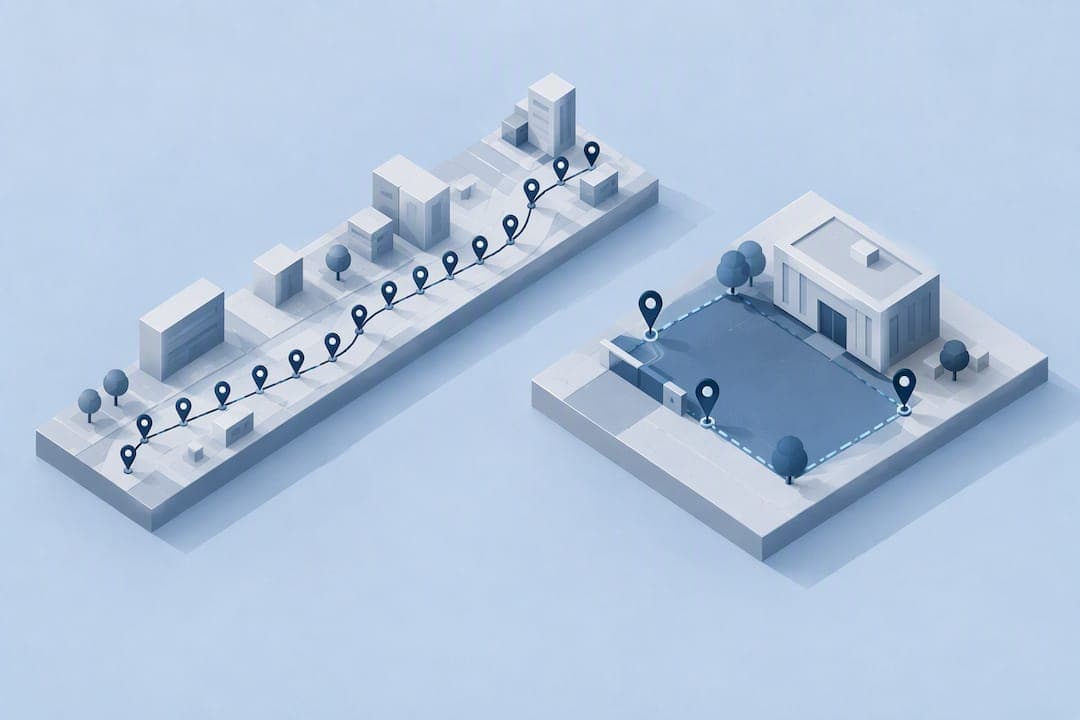
GPS tracking and geofencing solve different problems: GPS gives you a continuous stream of where a device is, while geofencing triggers an action only when a device crosses a virtual boundary. For routing, delivery tracking, or asset recovery, GPS is typically the better fit. For attendance, job-site check-ins, and most workforce needs, geofencing (the approach Clock-Me builds on) usually delivers the accuracy you need with far less privacy exposure.
TL;DR:
- Use circular geofences for ordinary sites and polygon boundaries for irregular properties; indoor coverage may require wireless network or Bluetooth signals when satellite reception is weak.
- For false boundary triggers, add dwell time and check satellite count, speed, heading, and HDOP before widening the geofence radius.
- Geofence alerts may fail when employees grant location access only while using the app; onboarding should explain the separate permission for background location access.
- At job sites, geofences can range from 50 to 150 meters; randomized shift checks add auditable records without continuous background monitoring.
Table of Contents
- What Is GPS Tracking and How Does It Work?
- What Is Geofencing and How Do Triggers Work?
- Five Practical Differences to Weigh
- Which Tasks Favor GPS, and Which Favor Geofencing?
- Why False Triggers Happen and How to Prevent Them
- How to Choose: A Short Decision Checklist
- Clock-Me in Practice: Event-Based Geofencing and Verified GPS Punches
- Author Perspective: Practical Recommendations for Managers and Individuals
- How Clock-Me Can Help
- FAQ
- Sources
What Is GPS Tracking and How Does It Work?
GPS, built on the broader GNSS satellite network, calculates a device's position by measuring signal travel time from multiple satellites. A receiver can report that position continuously (every few seconds) or periodically, depending on how the app or device is configured.
Accuracy depends on more than just the chip in your phone. Satellite geometry, HDOP (a measure of positional error), and multipath interference (signals bouncing off buildings) all affect how close the reported location is to the real one. That's why two people standing a few feet apart can see different accuracy readings on the same street.
Continuous tracking earns its keep in specific situations:
- Live routing for delivery drivers who need turn-by-turn updates
- Fleet monitoring where dispatchers track vehicles in real time
- Asset recovery for stolen equipment or vehicles
- Safety monitoring for lone workers in remote areas
What Is Geofencing and How Do Triggers Work?
Geofencing draws a virtual boundary around a real location and watches for specific events: when a device enters, exits, or stays (dwells) inside that boundary. Rather than tracking a device every second, the system only acts when something crosses the line, which is why it's often called event-based tracking.
Geofences come in two common shapes. A circular geofence is simple to set up and works well for most job sites, while a polygon geofence follows the actual shape of a property, which matters for oddly shaped lots or buildings close to a boundary. Radius size matters too: a wide radius catches more movement but risks triggering too early, while a tight radius demands stronger GPS accuracy to work reliably.
Geofencing rarely relies on GPS alone. Depending on the use case, it draws on:
- Wi-Fi signals for indoor or near-building precision
- Bluetooth beacons for very short-range triggers
- Cellular tower data as a backup when satellite signal is weak
This mix of signals is part of why geofencing turns location data into enforceable workflow logic rather than a raw stream of coordinates.
Five Practical Differences to Weigh
Choosing between the two comes down to five factors that show up in almost every real deployment.
- Purpose: GPS tracking answers "where is this device right now, continuously?" Geofencing answers "did this device enter, leave, or stay in a specific zone?"
- Accuracy and environment: GPS signal degrades indoors, in urban canyons, and under heavy tree cover; geofencing inherits the same limits but can offset them with Wi-Fi or beacon signals.
- Battery and data use: Continuous GPS polling drains batteries faster, while most mobile operating systems optimize geofence triggers at the OS level, using far less power.
- Timeliness and granularity: GPS gives you a live, moving picture; geofencing gives you discrete enter and exit events, which is less data but easier to audit.
- Privacy and permissions: Continuous streaming requires broader location disclosure, while event-based geofencing can limit data collection to the moments that actually matter.
An academic assessment of small geofences found that an adaptive tracking profile reached full reliability with average accuracy in the range of several tens of meters for geofences between 20 and 70 meters, while also saving battery compared with a constant, high-frequency tracking profile, according to research on geo-triggering performance. That tradeoff between accuracy and battery life is the core decision most teams face.
Which Tasks Favor GPS, and Which Favor Geofencing?
Matching the technology to the task saves both battery life and privacy headaches.
- Fleet navigation and live routing: GPS tracking wins here, since dispatchers need a constantly updating position.
- Staff attendance and job-site presence: Geofencing fits better, logging arrival and departure without watching every movement in between.
- Asset recovery or high-frequency monitoring: GPS tracking is the right tool when you need to locate a stolen trailer or a lost device fast.
- Proximity marketing and store promotions: Geofencing triggers a push notification the moment a shopper walks near a storefront. A practical comparison of location-based marketing strategies breaks down how retailers use this pattern.
- Asset tracking for vehicles and trailers: when short-range tags like RFID fall short, continuous GPS tracking becomes the more reliable option in recovery scenarios.
Many workforce tools combine both: geofencing handles routine attendance, while GPS kicks in only for specific verification moments.
Why False Triggers Happen and How to Prevent Them
GPS signal drifts, especially near buildings or under cloud cover, which means a device can appear to cross a geofence boundary when it hasn't actually moved. This near-boundary switching is one of the most common complaints about geofencing, and it's rarely a sign the technology is broken.
The fix isn't a bigger radius. Research on ML-enhanced geofencing shows that feeding signals like distance, speed, heading, satellite count, and HDOP into an anomaly detector (researchers used an Isolation Forest model) produces more stable inside-or-outside decisions than a simple radius check alone, according to a thesis on ML-enhanced geofence systems. Dwell-time logic, which waits a set number of seconds before confirming an entry or exit, filters out most of the noise.
Permissions add another layer of complexity. Modern Android and iOS versions require a separate "always allow" background permission for geofence triggers to fire reliably, so employees who only grant "while using the app" can silently break the system. User education during onboarding matters as much as the underlying technology.
Pro Tip: Pair dwell-time thresholds with satellite count and HDOP checks before you ever widen a geofence radius to fix false triggers.

How to Choose: A Short Decision Checklist
Running through a few questions before you commit saves weeks of rework later.
- Do you need continuous location, or just confirmation of presence? Continuous routing needs GPS; attendance and check-ins need geofencing.
- Is privacy a concern for your team or customers? Event-based geofencing collects less data and is easier to disclose clearly.
- Is indoor coverage required? If yes, plan for Wi-Fi or beacon signals alongside GPS.
- What are your battery constraints? Field devices used all day favor geofencing's lighter power draw.
- Run a short pilot: set your radius, dwell threshold, and monitoring period, then review permission and retention policies with a GPS tracking policy template before scaling to the full team.
Clock-Me in Practice: Event-Based Geofencing and Verified GPS Punches
We built Clock-Me around the same event-based logic covered above. Rather than streaming continuous location, we log GPS-verified clock-ins the moment an employee enters or exits a geofence sized between 50 and 150 meters, depending on the job site, paired with randomized check-ins during a shift to keep records auditable without constant monitoring.
Our one-tap verified punch combines on-device and server-side GNSS checks to catch fake-GPS apps, a common method of buddy punching. Together, event-based geofencing for time tracking and fraud detection give managers accurate records while keeping the data footprint smaller than continuous tracking requires.

Author Perspective: Practical Recommendations for Managers and Individuals
Our honest take: most teams default to continuous GPS because it feels thorough, not because the job actually needs it. Attendance and job-site presence rarely require a live feed. Event-based geofencing, backed by privacy-preserving event collection practices, tends to answer the real question with less data and less legal exposure. Save continuous GPS for routing or recovery, where the tradeoff actually pays off.
— Clock-me
How Clock-Me Can Help
We designed Clock-Me to apply everything above without asking you to choose between accuracy and privacy. Our platform pairs event-based geofences with one-tap GPS-verified punches and built-in fraud detection, so attendance records stay accurate without continuous background tracking.
You can start with our Free plan or explore Starter, Growth, and our other plans to see which fits your team's size and field operations.
FAQ
What Are the Downsides of Geofencing?
Geofencing can produce false triggers near boundaries due to GPS drift, and accuracy varies with environment, sometimes degrading indoors or in rural areas. Proposed legislation like California's SB-238 also means employers may face new disclosure requirements for location-based workplace tools.
What Is the Main Difference Between GPS and Geofencing?
GPS tracking reports a device's location continuously, while geofencing only logs an event when a device enters, exits, or dwells inside a defined zone. Geofencing is generally considered less privacy-invasive because it limits data collection to those specific moments rather than streaming constant location.
Can I Do Geofencing Myself?
Basic geofencing is available through many consumer apps and smartphone settings, letting you set a radius around a location and receive alerts. For workforce attendance, a dedicated platform with dwell-time logic, permission guidance, and fraud detection, like Clock-Me's geofencing features, handles the reliability issues that a simple DIY setup often misses.
Is Geofencing an Invasion of Privacy?
Geofencing is generally considered less invasive than continuous GPS streaming because it can be limited to enter and exit events rather than constant location logging. Proposed workplace surveillance rules, including California's SB-238, would still require businesses to disclose what location data they collect, why, and how long they store it.
Sources
- Today's Law As Amended - SB-238 Workplace surveillance tools.
- Performance Assessment of Geo-triggering in Small Geo-fences: Accuracy, Reliability, and Battery Drain in Different Tracking Profiles
- What is Geofencing? - Hexnode Blogs
- ML-enhanced geofencing thesis (Ahmed & Annamalai)