
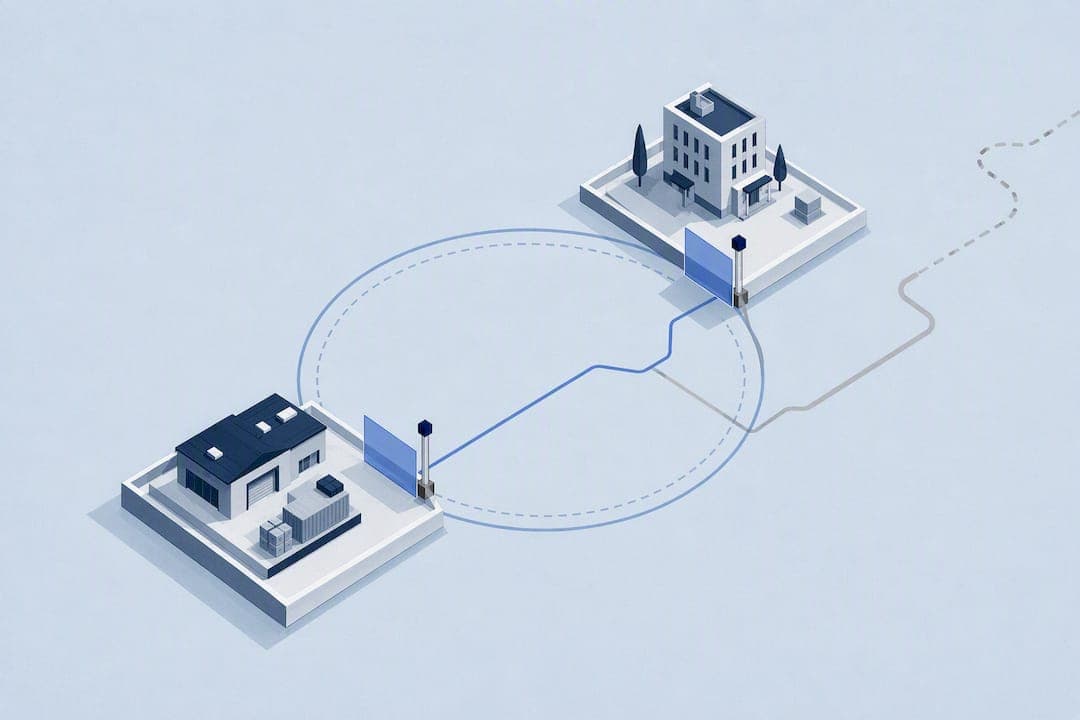
Geofencing works well for time tracking when it verifies location at the moment of clock-in rather than watching employees move all day, and when the vendor gives you real control over retention and identity checks. The single thing to inspect first: does the platform use event-based geofencing, or does it log continuous location? That one setting determines whether you get accurate attendance data or a privacy headache. The rest comes down to radius tuning, worker notice, and a short pilot before full rollout.
TL;DR:
- Event-based geofencing verifies employee location only at clock-in and clock-out, reducing privacy concerns compared to continuous tracking.
- Radius settings should be conservative and tailored to each site to avoid blocking legitimate punches due to GPS variability.
- Pairing location checks with identity verification, such as photo or device fraud detection, effectively prevents buddy punching.
- Proper setup includes mapping work sites accurately, conducting a pilot, and monitoring exception rates before full deployment.
- Clear communication and having an appeals process are essential to ensuring legal compliance and employee acceptance.
Table of Contents
- What Is Geofencing Time Tracking and How Does It Work?
- Benefits and Limitations of Geofencing for Workforce Timekeeping
- Privacy, Legal, and Data Practices Managers Must Check First
- What to Evaluate When Choosing Geofencing Time-Tracking Software
- Implementation Checklist: Setting Up, Piloting, and Rolling Out Geofencing
- Common Deployment Pitfalls and How to Avoid Them
- When an Integrated Geofencing Platform Makes Sense
- Ready to Pilot Geofencing? Here's Where to Start
- Documentation Worth Bookmarking
- Sources
- FAQ
What Is Geofencing Time Tracking and How Does It Work?
Geofencing time tracking uses a virtual boundary drawn around a job site, store, or office, then checks whether an employee's device is inside that boundary at the moment they punch in or out. The boundary is defined by a center point (an address or GPS coordinate) and a radius, usually set in meters. If the employee's phone reports a location inside that radius, the clock-in is approved. If not, the app can block the punch, flag it for review, or let a supervisor approve it manually.
The industry term for this is a geofence, and the practice sits inside the broader category of location-based timekeeping. Most vendor documentation splits it into two operating models, and the difference matters more than any single feature you'll see in a demo.
Event-based geofencing checks location only at specific moments, typically clock-in, break start and end, and clock-out. The system asks "was this person on-site right now?" and then stops watching. Deel's overview of employee geofencing describes this as validating a punch against an approved location at that single moment, rather than tracking a person continuously throughout the shift.
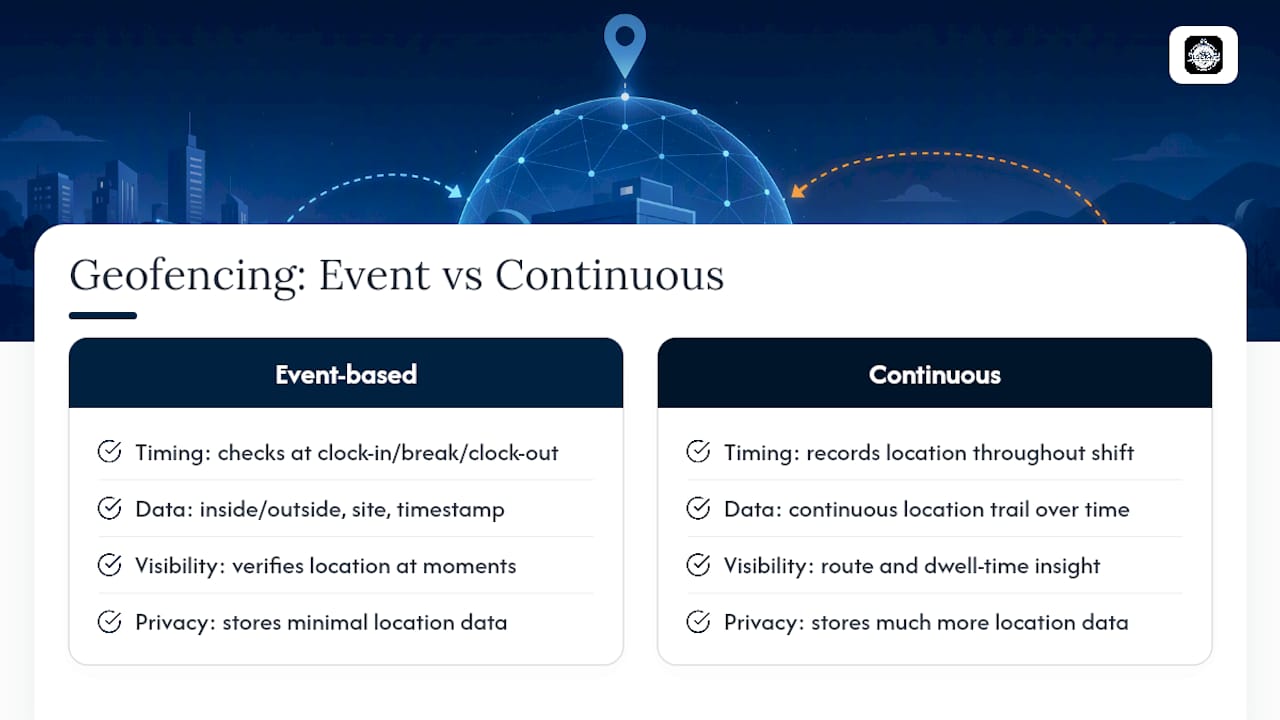
Continuous tracking keeps a location trail running for the duration of a shift, recording where a device moves over time. This gives you more visibility into route compliance or dwell time, but it also means storing far more location data, which raises the privacy stakes and the legal exposure considerably.
When a geofence check happens, most platforms record three things: an inside or outside flag, a site label (which location the punch was matched to), and a timestamp. Administrators typically configure which locations count as valid, how large each radius is, and what happens when a punch falls outside the boundary. Some systems block the punch outright; others log it as an exception for a supervisor to review. Oracle's geo-fence documentation lays this out clearly: administrators set coordinates or an address, define a variance radius in meters, and choose whether a deviation blocks the punch or simply generates an exception for review.
Understanding this distinction changes how you read a sales pitch. A vendor that says "we track your team's location" could mean either model, and the difference is the gap between a lightweight verification tool and a system that logs every move an employee makes for eight hours straight.
Benefits and Limitations of Geofencing for Workforce Timekeeping
Geofencing solves a specific, expensive problem: verifying that the person who clocked in was actually where they claimed to be. That single capability drives most of the return on investment, but it comes with real technical tradeoffs you should weigh before committing budget.
Where geofencing earns its keep
- Reduces buddy punching. A coworker clocking in for someone else stops working when the app requires the punching device to be physically inside the geofence.
- Cleans up payroll approvals. Supervisors spend less time chasing down "were you really on-site" disputes when the system already flagged the answer.
- Creates a defensible attendance record. Location-stamped punches give you something concrete to point to during a wage dispute or audit, rather than a paper timesheet someone filled in from memory.
- Fits naturally into field workflows. Crews already carry phones; a one-tap clock-in adds almost no friction to a job that starts and ends at a fixed site.
Where it runs into real limits
GPS accuracy varies by device, building materials, and weather. A phone inside a steel-frame warehouse or a parking garage can report a location fifty meters off from where the person is actually standing. That variance is why a tight radius, say 20 meters around a small storefront, can accidentally block legitimate clock-ins from employees standing at the front counter.

Battery drain and device compatibility add friction too. Older Android devices handle background location differently than newer iPhones, and a geofencing app that constantly polls GPS will drain a battery faster than one that checks location only at punch events. This is another reason event-based capture tends to outperform continuous tracking in day-to-day reliability, not just privacy.
Who benefits most, and who should think twice
Field service crews, construction sites, retail locations, and logistics operations get the most value from geofencing, since these industries share one trait: work happens at a fixed, identifiable physical site. A remote software team or a workforce that travels between dozens of unpredictable client sites each week will find geofencing harder to configure and less useful, since you'd need to draw and maintain boundaries for every possible location.
Privacy, Legal, and Data Practices Managers Must Check First
Before you enable geofencing for a single crew, you need answers to three questions: what data gets captured, how long it's kept, and whether your workers have been told about it in plain language. Skipping this step is how a useful attendance tool turns into a legal liability.
Event-based capture is the safer default from a privacy standpoint. Deel notes that vendors using event-based geofencing typically record location only at clock-in, break points, and clock-out, and don't retain a continuous movement trail. That distinction is worth stating plainly to your team: you're verifying a moment, not monitoring a shift. Framing it this way, and building the system to actually work that way, tends to improve acceptance among field employees who are understandably wary of being tracked all day.
What most geofencing platforms store per punch:
- An inside/outside flag showing whether the device was within the defined radius
- A site label identifying which location the punch matched
- A timestamp for the punch event
- Sometimes a photo or identity verification result alongside the location check
Statistic worth sitting with: there's no universal legal retention period for this data because rules vary by jurisdiction, industry, and whether the worker is covered by a collective bargaining agreement. That's exactly why the vendor's retention controls matter more than any marketing claim about "compliance." Some platforms let administrators configure automatic deletion after a set period, which Deel's documentation flags as a common configurable option rather than a fixed policy.
Worker notice matters just as much as the technical setup. Employees should know, before their first shift with the app, what data is collected, when it's collected, how long it's kept, and who can see it. This isn't just good practice, it's often a legal requirement depending on your state or country, and requirements differ enough that you should confirm the specifics with an employment attorney familiar with your jurisdiction rather than relying on a vendor's generic compliance page.
Four administrative features are worth demanding from any vendor before you sign a contract:
- Audit logs that show who changed a geofence radius or approved an exception, and when.
- Data export so you retain your own copy of attendance records independent of the vendor.
- Retention controls that let you set an automatic deletion window rather than storing location data indefinitely.
- Worker-facing visibility into their own punch history, so the relationship doesn't feel one-sided.
Clock-me's data safety summary and privacy policy lay out exactly this kind of detail, which is worth reading regardless of which platform you end up choosing, simply as a benchmark for what a vendor should disclose.
What to Evaluate When Choosing Geofencing Time-Tracking Software
Most vendor comparisons focus on feature checklists. A better approach is to evaluate against the operational questions that actually determine whether the system works once real crews are using it in the field.
Accuracy and enforcement
Ask exactly how the radius is configured, and whether tolerance is adjustable per site. A single default radius applied to every location is a warning sign, since a small retail storefront and a forty-acre construction site need very different boundary sizes. Confirm whether the system supports per-workgroup overrides, since enterprise platforms like Oracle's PeopleSoft allow custom variance radii by team, which matters if you manage both a warehouse crew and a mobile repair team under one account. Also confirm what happens on a deviation: does the app hard-block the punch, or log an exception for a supervisor to approve?
Identity verification
Geofencing tells you where a device is. It doesn't tell you who's holding it. Look for platforms that pair location verification with an identity check, whether that's a photo stamp at clock-in or device-level fraud detection that flags when the same phone is used to punch in multiple employees. This is the layer that actually closes the buddy-punching loophole, since a geofence alone can't stop two coworkers from swapping phones.
Privacy architecture
By now you know to ask whether the system is event-based or continuous. Push further: does the vendor let you set a retention window, and can workers see their own location history? A platform that treats this as configurable, rather than fixed, gives you room to match your policy to your industry and your state's requirements.
Integration and payroll workflow
- Does the platform export timesheets directly to your payroll provider, or require manual reconciliation?
- Is there an API for connecting to existing HR or scheduling software?
- Can supervisors approve timecards in bulk, or only one at a time?
A geofencing tool that nails accuracy but dumps you into a spreadsheet at payroll time creates a new bottleneck exactly where you were trying to remove one.
Usability
Field employees won't tolerate a clunky app for long. A one-tap clock-in, an offline mode that queues punches when a job site has no signal, and a supervisor dashboard that surfaces exceptions without requiring a manual search are the difference between a tool your crew actually uses and one they route around.
Pricing shape
Most geofencing time clocks price per active employee per month, with tiers based on headcount or feature depth. Watch for hidden costs: some vendors charge extra for hardware kiosks, onboarding support, or advanced reporting that seemed included in the demo. A transparent per-user model with a free tier for small teams is easier to budget against than a quote that changes after the sales call.
Pro Tip: Before signing any contract, ask the vendor to show you exactly what an exception looks like on the supervisor dashboard, not just the clock-in screen. That's where you'll spend most of your time once the system is live.
Implementation Checklist: Setting Up, Piloting, and Rolling Out Geofencing
Getting geofencing right is less about the software and more about the sequence you follow to deploy it. Skip a step here and you'll spend your first month fielding complaints instead of reviewing clean timesheets.
-
Map every work location and assign a radius. Start conservative, wider rather than narrower, especially for large sites like warehouses or construction lots where GPS drift is common. A moderate radius is generally recommended for most single-building sites; large outdoor sites may need a larger radius.
-
Write a policy for off-site punches before you launch. Decide in advance whether an out-of-boundary punch gets blocked automatically or flagged for supervisor review. Employees will hit edge cases in week one, delivery drivers stepping just outside a warehouse boundary, technicians parked at the edge of a client's lot, and you need an answer ready, not one you're improvising in a group text.
-
Run a short pilot with one crew or one site. A few weeks is usually enough to surface radius problems and device quirks without disrupting your whole operation. Workable's help documentation notes that geofencing only applies on days a worker's schedule is marked on-site, which is exactly the kind of configuration detail a pilot catches before it causes a payroll dispute across your entire workforce.
-
Monitor exception rates daily during the pilot. A high rate of blocked or flagged punches usually means your radius is too tight, not that your employees are trying to game the system. Adjust before you scale up.
-
Train supervisors on the exception workflow first, then train the broader team. Supervisors need to understand what an exception looks like and how fast they're expected to resolve it before crews start relying on the system for real paychecks.
-
Turn on audit logging and confirm data export works before you fully commit, not after you discover you need a record for a dispute.
-
Define your success metrics before rollout, not after. Track exception rate (percentage of punches falling outside the geofence), false block rate (legitimate on-site punches the system wrongly rejected), time-to-approve for supervisors reviewing flagged punches, and adoption rate among your crew. These four numbers tell you within two weeks whether the deployment is working or needs adjustment.
Most of the friction in a geofencing rollout comes from skipping the pilot and going straight to full deployment. A radius that looked fine on a map can block a third of your legitimate clock-ins once real phones with real GPS variance start using it.
Common Deployment Pitfalls and How to Avoid Them
Even well-chosen software fails in practice when the rollout ignores a few predictable traps. Here's what tends to go wrong, and the fix for each.
-
Radius set too tight. A boundary drawn to the exact edge of a building blocks legitimate punches from employees standing just outside the door, in a parking lot, or on an adjacent loading dock. Widen the radius during your pilot rather than assuming precision equals accuracy.
-
Choosing continuous tracking by default. Unless you have a specific, legally justified reason to monitor location throughout a shift, and clear worker consent for it, event-based checks at clock-in and clock-out give you the verification you need with far less privacy exposure and far less data to secure.
-
Not testing low-GPS environments. Parking garages, steel-frame buildings, and rural sites with weak cell signal all degrade location accuracy. Test your actual work sites before launch, not just your office, and document what happens when a punch fails: does it queue offline, block outright, or flag for review?
-
Misconfigured schedules blocking geofencing entirely. Some platforms only apply geofencing on days a worker's schedule marks them as on-site, a detail Workable's help center calls out explicitly. Check this setting directly rather than assuming geofencing is active just because you enabled the feature.
-
Rolling out without communicating the policy change first. Employees who discover geofencing through a blocked punch, rather than through a memo or team meeting beforehand, tend to assume the worst about surveillance. Explain what's tracked, when, and why, before the first shift it applies to.
-
No appeals path. Give employees a clear, fast way to flag a wrongly blocked punch and get it corrected without a week-long email chain. A single point of contact, usually the direct supervisor, resolves most disputes within a day.
When an Integrated Geofencing Platform Makes Sense
Most of the friction described in this guide, tight radii blocking legitimate punches, unclear retention policies, buddy punching that geofencing alone doesn't stop, comes down to picking a system that treats location as a surveillance feature rather than a verification layer. That distinction is the whole argument for choosing carefully rather than defaulting to whatever your payroll provider bundles in.
Our recommended approach uses verified GPS clock-ins that check location at the moment of punch, paired with identity verification so a geofence isn't the only thing standing between an honest attendance record and buddy punching. The platform's feature set pairs geofencing with device-based fraud detection and a live dashboard, which addresses the gap this guide flagged earlier: geofencing alone tells you where a device is, not who's holding it.
The admin controls matter as much as the clock-in mechanic. Timecard attestation, audit logging, and configurable approval workflows give managers the kind of oversight this guide argues is non-negotiable, not an afterthought bolted onto a location pin. Some platforms offer additional labor law compliance features to address stricter state regulations, which generic time clocks may not account for.
None of this replaces the pilot process outlined earlier. Any platform, Clock-me included, needs a small test group, a radius you've actually tuned against your real sites, and KPIs you're tracking before you hand it to your whole workforce. Start there. Use the get-started guide to configure your first geofence, run it with one crew for two weeks, and measure exception rate and false block rate before you decide anything about a full rollout.
— Clock-me
Ready to Pilot Geofencing? Here's Where to Start
If you've read this far, you already know the questions to ask a vendor: event-based or continuous tracking, what retention controls exist, and whether identity verification backs up the location check. Clock-me answers all three directly, and the fastest way to see how is to configure your own pilot rather than sit through another demo.
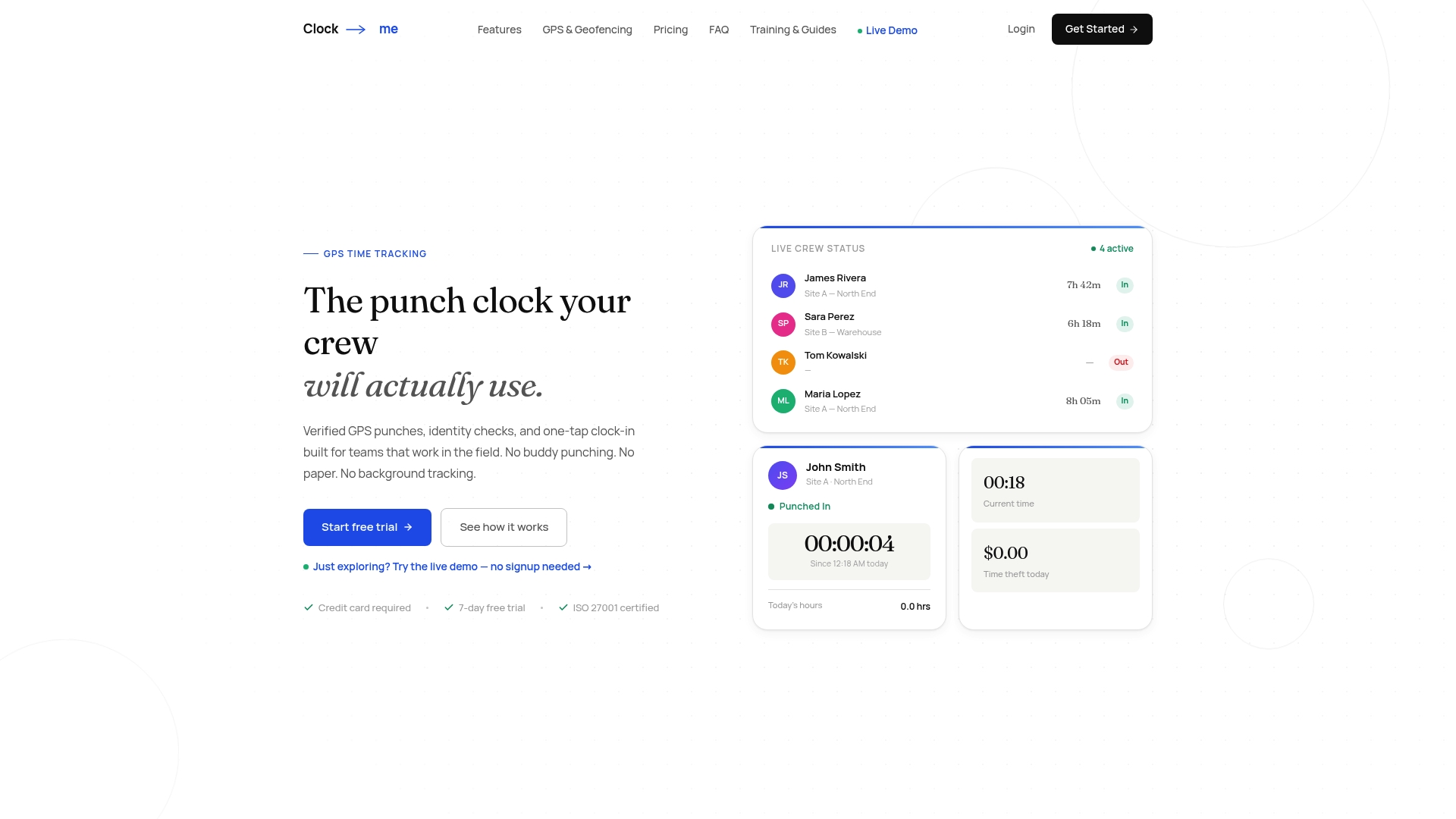
The setup guide walks you through the same sequence this article recommends: mapping your work locations, setting a radius, and configuring your off-site punch policy, all before your first crew member taps in. The one-tap clock-in keeps the worker side simple, while the admin dashboard gives you the exception review, audit logging, and payroll export this guide flagged as non-negotiable.
Start with the KPIs already covered here: exception rate, false block rate, and time-to-approve. Track them for two weeks with a single site or crew using Clock-me's free plan, then decide whether to expand. If you want a walkthrough of the geofencing setup or the identity verification options before you commit, you can also review the full feature breakdown or reach out through the contact form to schedule a demo.
Documentation Worth Bookmarking
A few primary sources are worth keeping on hand once you move from research to configuration. Deel's explainer on employee geofencing gives a clear walkthrough of event-based versus continuous tracking, useful when you're explaining the distinction to your own team or legal counsel. Workable's help center article on enabling geofencing is a practical reference for how per-site and per-schedule configuration actually works, including the scheduling dependency that trips up a lot of first-time deployments. Oracle's documentation on setting up geo-fences shows how enterprise-grade systems handle variance radius and deviation actions, a good benchmark even if you're evaluating a smaller vendor.
For your own compliance file, Clock-me's data safety summary and privacy policy are worth reading in full, since they spell out exactly what gets captured and retained, the kind of detail you should demand from any vendor before signing.
Sources
- What is employee geofencing for time tracking? — Deel
- Enabling geofencing for time tracking – Workable Help
- Setting Up Geo Fences — Oracle
FAQ
What Is Geofencing for a Time Clock?
Geofencing for a time clock draws a virtual boundary around a work location and checks whether an employee's device is inside that boundary at the moment they punch in or out. Most platforms record an inside/outside flag, a site label, and a timestamp for each punch rather than tracking location continuously.
What Are the Disadvantages of Geofencing?
The main drawbacks are GPS accuracy variance near large buildings or in low-signal areas, radius settings that can block legitimate on-site punches if drawn too tightly, and privacy concerns if the system uses continuous tracking instead of event-based checks. Battery drain and inconsistent behavior across older devices can also cause friction for field crews.
Is It Legal to Track Employees With GPS?
Legality depends on your jurisdiction, the type of tracking (event-based versus continuous), and whether workers received clear notice and consent. Employers should confirm requirements with employment counsel familiar with their state or country rather than relying on a vendor's general compliance claims, since rules on notice and data retention vary widely.
What Is Geofencing Tracking, Exactly?
Geofencing tracking validates a worker's location against a predefined zone, typically at clock-in and clock-out, rather than following their movement throughout a shift. This event-based approach is the model most privacy-conscious vendors, including Clock-me, use to verify attendance without storing a continuous location trail.
How Do I Know if Geofencing Is Right for My Team?
Geofencing works best for teams with fixed, identifiable work sites, such as field service, construction, retail, or logistics operations, where verifying on-site presence solves a real payroll accuracy problem. Teams that work from unpredictable or constantly changing locations will find the setup harder to maintain and less useful.