

Clock-Me is the strongest fit for most construction and field teams running job site time tracking today, because it pairs GPS-verified punches and geofencing with offline reliability and payroll exports that survive a real pay cycle. A basic free timer can still work for a two-person crew with one address and no job costing to track. Everyone else needs verification, not just a stopwatch.
TL;DR:
- Confirm that the time tracking system provides GPS accuracy claims and handles indoor drift to prevent location spoofing.
- Ensure geofencing can be drawn as irregular shapes around each site boundary to accurately flag out-of-bound punches.
- Verify offline capture and local punch storage, with seamless sync once the connection is restored, especially for rural or complex sites.
- Test that job or cost codes are automatically embedded in punches to improve payroll accuracy and avoid manual reconstruction.
- Conduct a pilot on one site, verifying that the export formats match payroll requirements and that offline punches sync correctly before scaling.
Table of Contents
- What Job Site Time Tracking Actually Delivers For Field Crews
- Essential Features To Require From Any Jobsite Time Clock
- How To Choose The Right Job Site Time Tracking Solution
- Rolling Out Job Site Time Tracking Without Losing A Payroll Cycle
- What Job Site Time Tracking Costs, And What It Saves
- Connecting Job Site Time Tracking To Payroll And Accounting
- Clock-Me's Feature Claims And How To Verify Them In A Live Demo
- Why GPS Verification Changes The Math For Field Crews
- Try Clock-Me On Your Next Job Site Before You Commit Company-Wide
- Sources
What Job Site Time Tracking Actually Delivers For Field Crews
Job site time tracking means recording who clocked in, where, on which job, and syncing that data cleanly into payroll. It's not a digital time card. Done right, it tags every punch with a GPS coordinate, ties it to a specific job or cost code, and flags anything that looks off, like a punch from 40 miles off-site, before payroll ever sees it.
The payoff shows up first in payroll accuracy. Manual time cards and rounded-up paper logs routinely overstate hours by rounding in the worker's favor, and disputes over "I was there by 7" versus what a supervisor remembers waste hours every pay period. GPS-tagged punches remove the guesswork. Job costing improves for the same reason: when every punch carries a job or cost code, you know exactly how many labor hours a specific project actually consumed, not an estimate reconstructed from memory two weeks later.
Real job sites complicate this. Crews move between sites mid-shift. Cell coverage drops out in basements, rural sites, and behind steel framing. Workers share tablets or use personal phones inconsistently. Any tracking approach that assumes constant connectivity and one device per person will fail on a real site within a week.
A workable system handles these constraints directly:
- One-tap clock-in from a phone or shared kiosk, with the location captured automatically rather than typed in.
- Supervisor approval queues that catch missed punches or edits before they hit payroll.
- Job or cost-code selection built into the punch itself, not added later in a spreadsheet.
- Offline capture that stores the punch locally and syncs once signal returns.
Industry roundups increasingly treat field-focused platforms as a different category from general-purpose time trackers built for desk workers, and for good reason: Zapier's testing of leading time tracking apps found that offline sync and GPS verification separate the tools that survive real job sites from the ones that only look good in a sales demo.
Essential Features To Require From Any Jobsite Time Clock
Most vendor pitches sound similar. The differences show up in the details, and those details determine whether the system holds up on a muddy site with two bars of signal. Here's what to check, in the order it matters most.
- GPS verification with real accuracy claims. Ask what accuracy radius the app guarantees and how it handles GPS drift indoors or under structural steel. A system that just logs "location on" without spoofing detection is trivially easy to fake with a location-spoofing app, which defeats the entire purpose.
- Geofencing tied to actual job boundaries. Geofencing should let you draw a boundary around each site and block or flag punches from outside it. Ask whether boundaries can be irregular shapes, not just a fixed radius circle, since job sites rarely fit a circle.
- Identity verification that stops buddy punching. Photo capture at clock-in, paired with location, catches the classic buddy-punching problem where one worker clocks in a whole crew. Biometric options exist too, though they add hardware cost and raise questions about consent and data storage.
- Offline capture and automatic sync. This is non-negotiable for rural sites, remote builds, or any structure with poor cell penetration. SoftwareAdvice's review of portable time clock hardware notes that ruggedness and local storage are consistently the features that separate field-ready hardware from consumer devices repurposed for jobsite use.
- Per-job cost codes baked into the punch. You want labor hours automatically split by job, phase, or cost code at the moment of clock-in, not reconstructed afterward from supervisor notes.
- Payroll export in the format your system actually accepts. CSV and Excel exports cover most cases; API connections to platforms like ADP or QuickBooks save the manual reconciliation step entirely.
- Audit logs, edit history, and overtime alerts. Every manual edit should leave a timestamp and a name attached to it. Overtime alerts that fire before a shift ends, not after payroll runs, prevent a lot of unpleasant surprises.
Hardware choice matters more than most buyers expect going in. Shared kiosks make sense for crews that don't carry personal phones or where device hygiene is a concern on dirty sites, while bring-your-own-device setups cut hardware cost and work well for crews already comfortable with smartphones. Reviews aggregated on Capterra consistently rank GPS verification, job costing, and payroll integration as the three features contractors care about most, well ahead of cosmetic dashboard features.
Pro Tip: Ask any vendor to show you exactly what happens when a phone loses signal mid-shift. If the demo can't show a punch queued locally and synced later without data loss, that's a disqualifying gap, not a minor one.
How To Choose The Right Job Site Time Tracking Solution
Start with scale. A single-site operation with a stable crew has different needs than a contractor running six active jobs with subcontractors rotating through weekly. Multi-site operations need geofencing that scales to dozens of boundaries and reporting that rolls up by job without manual filtering.
Connectivity testing deserves its own step in your evaluation, not an assumption. Ask the vendor to demo a clock-in with airplane mode enabled, confirm the punch stores locally with a timestamp, then re-enable connectivity and watch it sync. If the sales rep hesitates or offers to "follow up" instead of showing it live, treat that as a real signal about how the offline mode actually performs in production.
Integration fit comes next. Get a sample export file before you sign anything and hand it to whoever runs payroll. Have them confirm the columns map cleanly to your existing payroll codes, including overtime and shift differentials. A vendor demo recommendation worth following: industry roundups routinely advise running a live sandbox payroll cycle with real data before committing to a full rollout, because export mapping problems only surface once you try to reconcile an actual pay period.
Compliance requirements add another filter. If you bid public projects, you likely need certified payroll reporting or prevailing wage documentation, and not every platform generates those reports natively. Confirm this before you assume a generic export will satisfy a Davis-Bacon or state prevailing wage requirement.
Operational fit is where a lot of good systems get rejected by the crew that has to use them daily. Test clock-in simplicity with someone who isn't tech-savvy. Confirm the app supports the languages your crew actually speaks. Decide up front whether you're standardizing on BYOD, kiosks, or a mix, because retrofitting that decision later means re-provisioning every device.
Before you sign, run this checklist during vendor demos:
- Does the offline mode genuinely queue and sync punches without data loss?
- Can you draw a custom geofence shape around your actual site boundary?
- Does the export file match your payroll system's required columns exactly?
- Is there a working reference customer in construction, not just general field services?
- What's the actual support response time, not the SLA on paper?
Pro Tip: Score each vendor on a simple 1 to 5 scale across GPS accuracy, offline reliability, export fit, and ease of use for your crew. A tool that scores a 5 on dashboards but a 2 on offline sync will fail you on the one site that matters most.
Rolling Out Job Site Time Tracking Without Losing A Payroll Cycle
A rushed, all-at-once rollout is how job site time tracking projects fail. A staged approach protects you from discovering a mapping error after payroll already ran.
- Pilot on one site with one crew for two to four weeks. Track adoption rate, punch accuracy against a manual log, and whether the payroll export passes review without manual correction. Aim for close to 100% adoption and zero unresolved discrepancies before expanding.
- Configure geofences and cost codes before training anyone. Set boundaries for every active job, assign cost codes to match your existing chart of accounts, and map export fields to payroll categories in advance.
- Decide device provisioning early. If you're using kiosks, get them installed and tested at the site before day one. If BYOD, confirm every worker's phone can run the app and has the location permission actually enabled, which is a more common failure point than most managers expect.
- Train with a short, hands-on session, not a manual. A five-minute supervisor script covering clock-in, corrections, and approvals beats a written guide most crews won't read. Provide materials in every language your crew speaks.
- Monitor daily during the pilot for missed punches, GPS errors, and sync failures. Early issues are almost always device permission settings or a geofence drawn too tight around a site boundary, not the software itself.
- Scale once the pilot clears your accuracy and adoption thresholds. Roll out site by site rather than company-wide overnight, so support capacity keeps up with new users.
What Job Site Time Tracking Costs, And What It Saves
Pricing for field time-tracking platforms generally follows a per-employee-per-month model, with tiers that unlock geofencing, integrations, and compliance reporting as you move up. Basic free tiers exist and cover simple clock-in and clock-out, but they typically drop the features that matter most for construction: geofencing, offline sync, and payroll integration.
Hidden costs show up in onboarding time, supervisor training hours, and any custom integration work if your payroll system doesn't have a direct connector. Budget for the admin time spent during the pilot phase, since that's usually underestimated.
| Cost factor | What drives it | Where it shows up |
|---|---|---|
| Subscription tier | Employee count, feature tier (geofencing, integrations) | Monthly SaaS bill |
| Hardware | Kiosks for shared-device sites vs BYOD | One-time purchase, per site |
| Onboarding | Training time, configuration of cost codes and geofences | Admin hours during rollout |
| Integration setup | API connector vs manual CSV mapping | One-time setup, ongoing reconciliation |
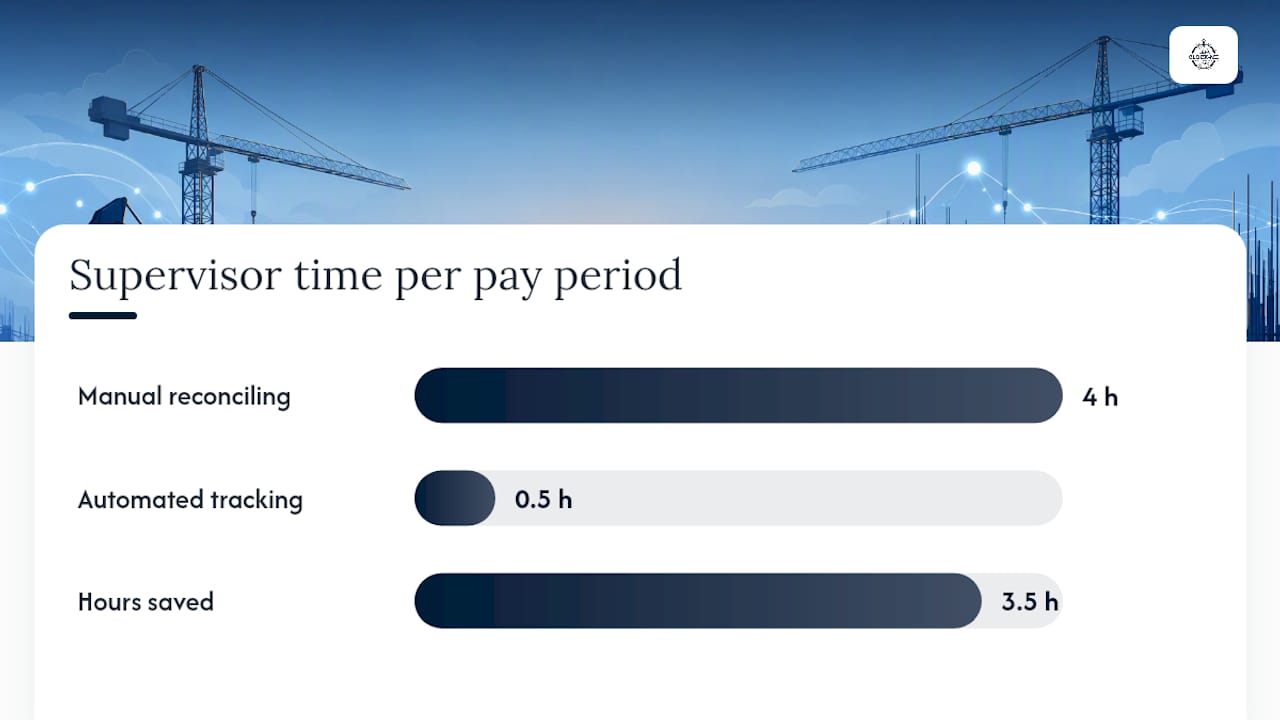
A simple ROI worksheet: if a supervisor currently spends four hours per pay period manually reconciling paper time cards across a 20-person crew, and automated tracking cuts that to 30 minutes, that's 3.5 hours saved per pay period, roughly 91 hours a year on biweekly payroll. Add in payroll errors caught before disbursement rather than corrected after, and the math tends to favor a paid platform quickly for any crew larger than a handful of people.
A free or basic tracker is genuinely fine for a solo contractor or a two-person operation working one job at a time with no cost-code tracking required. Once you're running multiple sites or subcontracting crews, the gap in accuracy and reporting starts costing more than the subscription would.
Connecting Job Site Time Tracking To Payroll And Accounting
The integration step is where a well-chosen system either pays for itself or creates a second job for someone in the office. Three methods dominate: CSV or Excel export for manual upload, API connections that sync automatically, and direct connectors built for specific payroll platforms.
- Confirm which method your payroll provider actually supports before you assume an API connector exists.
- Map every time entry field, including overtime thresholds and shift differentials, to the exact payroll code your system expects.
- Run a sandbox payroll cycle with a full pay period of real data before going live, matching the exported totals against a manual calculation.
- Build an exception process for manual edits: who can approve them, and how the audit trail records the change.
SoftwareAdvice's coverage of portable time clock platforms points out that payroll connectors and export formats are consistently the deciding factor for payroll teams evaluating field tracking tools, ahead of most other feature comparisons. Skipping the sandbox test is the single most common mistake in this step. Mapping errors that seem trivial on paper, like a mismatched overtime multiplier, turn into real payroll corrections once they hit a live pay run.
Clock-Me's Feature Claims And How To Verify Them In A Live Demo
Clock-Me's core claims center on GPS-verified punches, geofencing, and identity verification designed specifically for field crews rather than office staff. The platform adds live dashboards showing crew attendance in real time and a one-tap clock-in built to work without a login wall for quick testing.
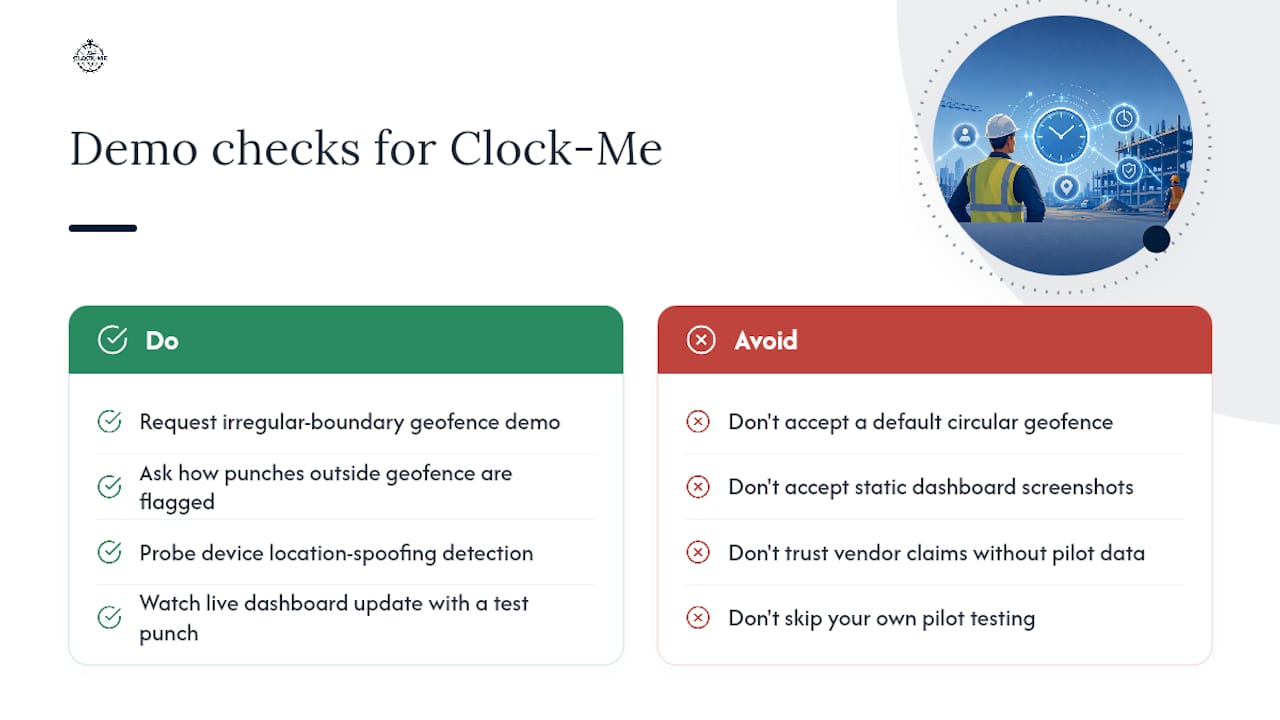
Here's what to actually check when you sit through a demo instead of taking the pitch at face value. For GPS accuracy, ask to see the geofencing setup drawn around an irregular site boundary, not just a default circle. For identity verification, ask how the system flags a punch attempted from outside the geofence or from a device showing signs of location spoofing. For the live dashboard, ask to see attendance update in real time as a test punch comes in, not a static screenshot.
Case study data and independently verified performance benchmarks for Clock-Me specifically weren't available for this review. Treat any vendor's own performance claims, Clock-Me included, as a starting point for your own pilot testing rather than a substitute for it.
Why GPS Verification Changes The Math For Field Crews
Paper time cards and honor-system apps fail construction crews for a specific reason: they assume trust where verification would work better. GPS-verified punches don't replace trust between a supervisor and a crew, but they remove the ambiguity that turns a five-minute disagreement about arrival time into a recurring payroll dispute. That shift matters more than most owners expect until they've lived through a few contested pay periods.
The practical move is straightforward. Run a 30-day pilot on one site, verify the payroll export against a real pay cycle before expanding, and judge the platform on whether the offline mode actually holds up, not on how the sales demo looked in a conference room with full WiFi.
— Cristiano
Try Clock-Me On Your Next Job Site Before You Commit Company-Wide
Clock-Me covers the full checklist this guide walks through: GPS-verified punches, geofencing around actual job boundaries, identity verification to stop buddy punching, offline capture that syncs once signal returns, and payroll exports built for reconciliation rather than manual cleanup.
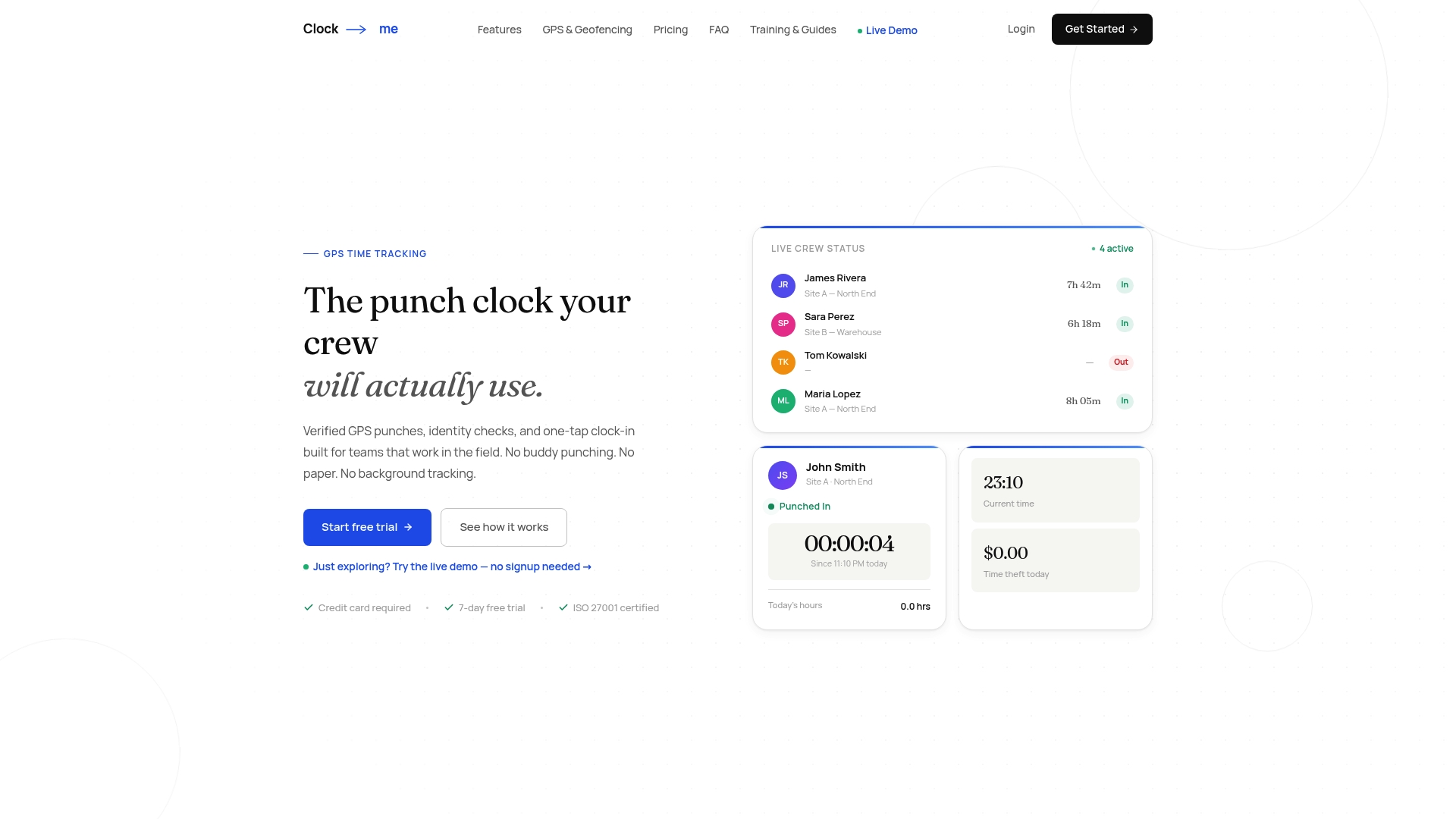
What sets it apart from a generic time-tracking app retrofitted for field use is that geofencing, location verification, and offline reliability were built for construction sites from the start, not bolted on afterward. You can test the live dashboard and clock-in flow without creating an account first, which makes it easy to run the exact demo checks covered above: airplane-mode punches, geofence accuracy, and identity verification, before you ever talk pricing.
If the checklist in this guide matches what your crew actually needs, the next step is simple: start a pilot on one active site, check the feature details and plan options, and confirm the payroll export works with a real pay period before rolling it out company-wide.
Sources
Cross-reference vendor claims against neutral sources before committing budget. Zapier's roundup of time tracking apps breaks down the split between general-purpose and field-focused tools. Capterra's user reviews for field time-tracking platforms surface real complaints and praise you won't get from a sales deck. For Clock-Me specifically, review the features breakdown and pricing details directly, and compare demo claims against what user reviews on independent platforms actually report.