
The fastest way to cut payroll errors and produce audit-ready visit evidence is a HIPAA-aligned, GPS-verified time clock that ties every punch to a scheduled visit, with geofencing, EVV-ready scheduling, and direct payroll export. Clock-Me offers a demo-ready version of exactly that setup. It reduces disputed hours, gives you clean documentation for audits, and takes the guesswork out of caregiver scheduling.
TL;DR:
- Accurate GPS-verified punches linked to specific visits are essential for audit readiness and reducing payroll disputes, especially when combined with verified location data.
- Vendors must provide valid documentation like a signed BAA, encryption details, and access logs, with clear policies on GPS use and data retention for compliance.
- Scheduling must incorporate recurring templates, open-shift broadcasting, and EVV-ready evidence to prevent orphaned clock-ins and billing rejections.
- Event-driven GPS verification outperforms background tracking by respecting caregiver privacy, minimizing battery drain, and offering a more defensible data trail.
- Implementation typically takes one to six weeks, requiring careful planning of roster import, geofence setup, and staff training, with thorough vendor vetting through specific questions.
Table of Contents
- What Should Home Health Time Tracking Actually Do?
- What HIPAA Documents Should You Ask a Vendor For?
- How Do Scheduling and EVV Fit Together?
- How Does GPS Verification Actually Work?
- What Reports Do You Need Before Payroll Runs?
- How Long Does Implementation Actually Take?
- What Should You Ask Vendors Before Signing?
- How Clock-Me Maps to These Requirements
- What Does Home Health Time Tracking Actually Cost?
- Does It Integrate With Your EHR and Billing Software?
- The Trade-Off Nobody Talks About: Surveillance vs. Trust
- Ready to See Clock-Me in Action?
- Sources
What Should Home Health Time Tracking Actually Do?
A punch clock alone doesn't solve much for a home health agency. The real question managers should ask isn't "does it clock people in," but "does it connect that clock in to a real visit, a real client, and a real caregiver in a way I could defend to an auditor." That's the standard worth building toward.
Here's what a real home care scheduling and time tracking setup needs to cover:
- Visit-linked punches. Every clock in and out ties to a specific client, service type, and assigned caregiver, not a generic shift.
- Verified location evidence. GPS and geofence data, with telephonic backup for dead zones and photo or ID verification for identity confirmation.
- Scheduling integration. Recurring visits, open-shift publishing, and swap or coverage workflows that stay linked to the time record.
- End-of-visit documentation. Required fields like ADL logs or visit notes attached directly to the timecard before it closes.
- Exception handling. A clear review workflow flags mismatched or incomplete punches before payroll posts.
Home care time tracking models that attach mobile clock actions to visit context and manager review turn plain attendance data into something you can confidently stand behind during a state audit.
What HIPAA Documents Should You Ask a Vendor For?
Vendor marketing claims about "HIPAA compliance" mean little without paperwork behind them. Before signing anything, request:
- A signed Business Associate Agreement (BAA) covering any protected health information the platform touches.
- Documentation of encryption at rest and in transit for location and visit data.
- Access logging showing who viewed or edited a caregiver's timesheet and when.
- A data retention and deletion policy that matches your state's recordkeeping requirements.
Audit-ready evidence should look like a clean package: time-stamped geodata, any visit attachments (notes, ADL logs), and a manager's digital sign-off, all pulled together automatically rather than assembled by hand after the fact. On the privacy side, minimize continuous background tracking in favor of event-driven punches tied to clock actions, and put a short written GPS-use policy in your employee handbook so caregivers know exactly what's tracked and why.
Pro Tip: Post your GPS policy where caregivers sign onboarding paperwork, not buried in a 40-page manual. Transparency up front cuts pushback later.
Clock-Me's own data safety summary is a useful benchmark. It's worth asking any vendor for something equally specific.
How Do Scheduling and EVV Fit Together?
Scheduling isn't a separate system bolted onto time tracking. It's the input that gives every punch its context. Without it, you get orphaned clock-ins with no visit attached, which is exactly what triggers billing rejections.
A workable setup includes:
- Recurring visit templates with defined visit windows and automatic caregiver qualification matching.
- Open-shift broadcasting to fill last-minute call-outs without a manager making a dozen phone calls.
- EVV-ready evidence capturing visit start and end time, verified location, and caregiver ID, which is what most states and aggregators require.
- Scheduling handoff so a punch outside the scheduled window flags for review instead of quietly posting to payroll.
Platforms built for caregiver scheduling emphasize exactly this: recurring visits and coverage workflows exist to stop uncovered shifts from turning into churn or billing disputes.
How Does GPS Verification Actually Work?
There's a real difference between periodic background tracking, which pings a caregiver's location every few minutes regardless of activity, and event-driven verified punches, which only capture location at the moment someone clocks in or out. Event-driven is the better fit for home health: it respects caregiver privacy, doesn't drain phone batteries, and gives you a cleaner, more defensible data trail.
Ask any vendor these specifics:
- What's the geofence radius, and can it be tuned per client address (an apartment building needs a tighter radius than a rural property)?
- Does the system flag spoofed or manipulated locations, not just missing ones?
- What happens on an offline clock-in in a low-signal area? It should queue locally and sync automatically once signal returns.
- How are exceptions routed for manager review when a punch looks suspicious or incomplete?
What Reports Do You Need Before Payroll Runs?
Getting from time card to paycheck without errors comes down to what the system hands your payroll team. At minimum, expect:
- Audit-ready timesheets with visit attachments, manager sign-offs, and exception notes already resolved.
- Export flexibility. CSV, Excel, or direct API integrations that eliminate manual re-entry. Integrating time tracking with billing and RCM systems is one of the more reliable ways to cut payroll errors and administrative overhead.
- Authorization reconciliation. A report matching delivered hours against Medicaid or insurer authorized units, so you catch overages before they become billing disputes.
- A pre-payroll checklist covering duplicate shifts, missed break deductions, and unapproved overtime.
How Long Does Implementation Actually Take?
Getting live involves four steps: import your caregiver roster and client records, set up geofences at each service address, train caregivers on the app, and run a pilot before full rollout.
- A single-location agency can often go live in one to two weeks.
- A multi-branch operation should plan for four to six weeks, mostly due to authorization mapping across branches.
- Someone on your team, usually an office manager or scheduler, should own the roster import and geofence setup; don't leave it entirely to IT.
- Track pilot metrics closely: punch accuracy rate, average time-to-approval on timesheets, and any drop in payroll correction requests.
Structured onboarding with realistic scheduling windows and protected training time mirrors the time management guidance nursing organizations recommend for reducing staff stress and errors during transitions.
What Should You Ask Vendors Before Signing?
Run through this checklist during any demo:
- Will you sign a BAA, and can you show encryption and access-logging documentation on request?
- Is the system EVV-ready out of the box, or does it require a third-party aggregator bridge?
- How accurate is geofencing, and can radius be adjusted per address?
- What payroll export formats are supported, and do they integrate directly or require manual download?
- What happens during offline periods, and how are exceptions reviewed?
- What's the support response time for a caregiver locked out mid-visit?
Pro Tip: Score each vendor 1 to 5 on these six questions during the live demo, not after. Vague or delayed answers on the BAA question are the biggest red flag.
Walk away from any vendor that can't produce a BAA on request, that only offers continuous background tracking with no privacy controls, or whose "integration" is a manual spreadsheet download every pay period.
How Clock-Me Maps to These Requirements
Clock-Me's feature set lines up closely with the checklist above: verified GPS punches, identity verification, geofencing, live crew dashboards, and payroll export options.
During a demo, run these specific tests:
- Simulate a visit and confirm the punch attaches to a client location, not just a generic timestamp.
- Build a geofence around a sample address and test the radius against a nearby location to see how tight the boundary actually is.
- Force an offline punch by disabling data, then check whether it syncs correctly once signal returns.
- Export a sample payroll file and confirm the format matches what your payroll processor accepts.
Automating one-tap clock-ins and required end-of-visit fields also reduces the administrative load tied to the documented rise in health worker burnout, which climbed from 32% in 2018 to 46% in 2022. Less paperwork friction at clock-out time is a genuine relief valve, not just a compliance checkbox.
What Does Home Health Time Tracking Actually Cost?
Pricing in this category almost always follows a per-caregiver, per-month subscription model, layered on top of a one-time or lightly recurring setup cost. Three components determine your real monthly bill.
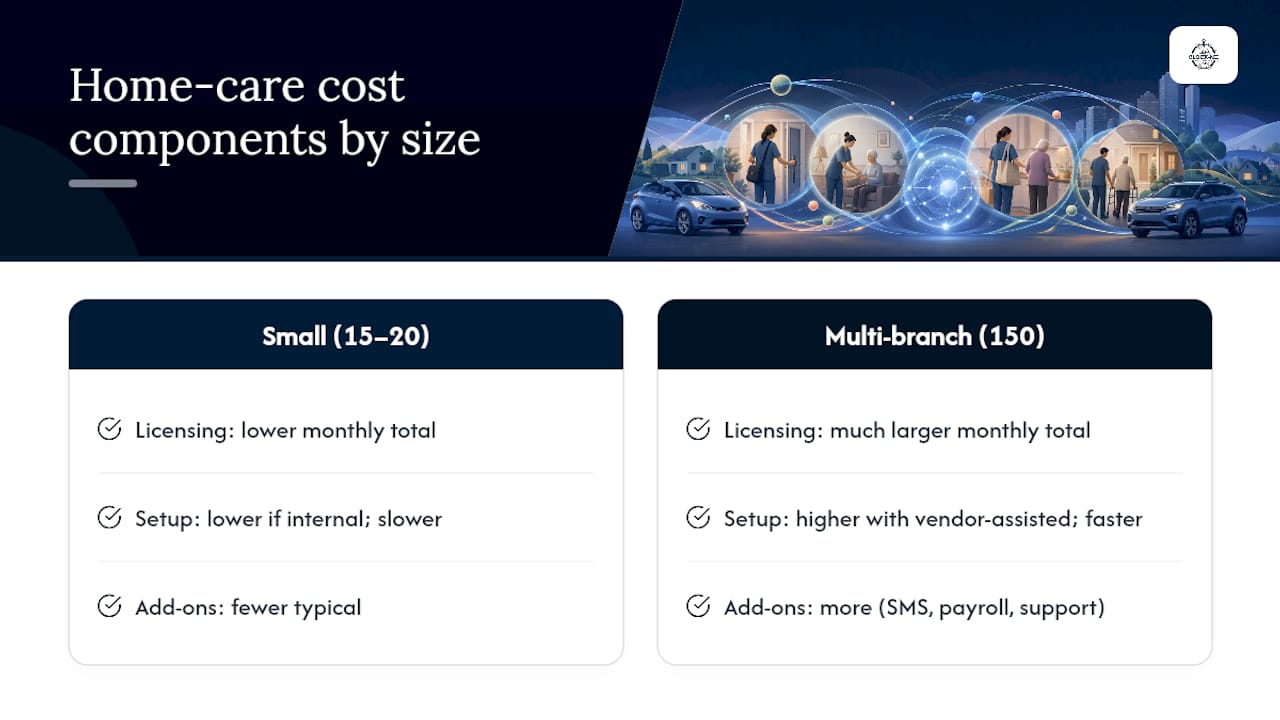
Licensing fees scale with headcount. A small agency with 15 to 20 caregivers pays substantially less per month than a multi-branch operation running 150 caregivers across several counties, even at the same per-seat rate, because volume discounts typically kick in above certain thresholds. Ask any vendor directly whether their pricing tiers unlock features like geofencing or payroll API access only at higher headcounts, since some vendors gate the features you actually need behind a pricier plan.
Setup costs cover roster import, geofence configuration for every client address, and initial caregiver training. Agencies that do this internally with existing staff time spend less upfront but take longer to go live. Agencies that pay for a vendor-assisted setup move faster but add a one-time fee.
Recurring fees beyond the base subscription usually involve add-ons: SMS or telephonic backup minutes for dead-zone clock-ins, additional payroll integration connectors, or premium support tiers with faster response times.
The honest budgeting approach is to request an itemized quote broken into these three buckets rather than accepting a single bundled number. That makes it far easier to compare against a competing vendor's structure, and it flags hidden costs like per-export fees or per-geofence charges that some platforms tack on quietly. Free trials or no-signup demos are worth using specifically to test whether advertised features are included in your actual plan tier, not just the top-tier showcase version.
Does It Integrate With Your EHR and Billing Software?
Time tracking that lives in isolation from your electronic health record and billing systems creates duplicate data entry, which is exactly where payroll and billing errors creep in.
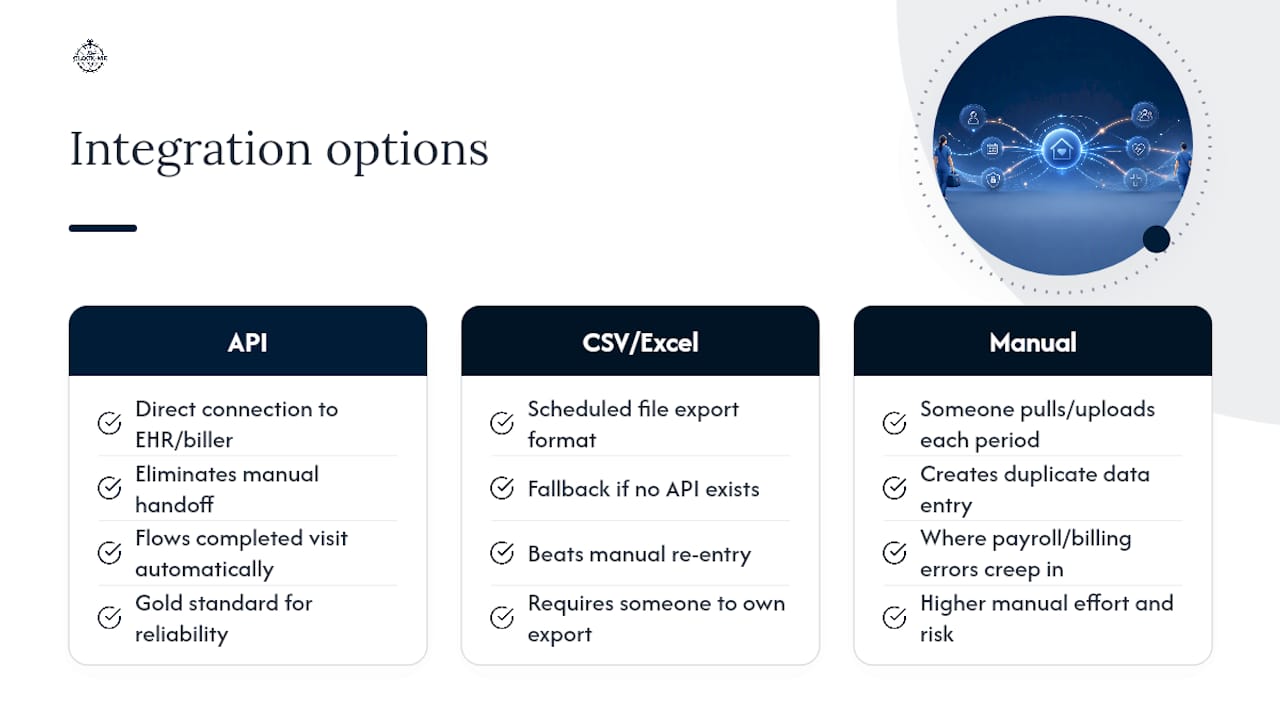
The integration question breaks into two parts. First: can the time-tracking platform export data in a format your EHR or billing software actually accepts, whether that's a direct API connection, a scheduled CSV export, or an Excel file formatted to your biller's specifications? Second: does that export happen automatically after visit completion, or does someone have to manually pull and upload it every pay period?
Direct API integrations are the gold standard because they eliminate the manual handoff entirely. A completed visit with an attached timecard flows straight into your billing queue, matched against the client's authorized service units. CSV and Excel exports are the fallback for agencies whose EHR or billing vendor doesn't support a direct connection, and they still beat manual re-entry, but they require someone to own that export step on a schedule.
Ask vendors specifically which EHR platforms and billing systems they've integrated with before, and request a sample export file to review with your billing team ahead of any contract signature. A vendor that can only describe integration in general terms, without naming specific systems they've connected to, likely hasn't built it yet.
The Trade-Off Nobody Talks About: Surveillance vs. Trust
Every home health manager eventually faces this tension: tighter GPS surveillance feels safer for compliance, but it can quietly erode caregiver trust and morale. Event-driven verification, tracking only at clock in and clock out, is the better balance. It gives you defensible evidence without turning every caregiver's phone into a leash.
My practical recommendation: run a two-week pilot with a small cohort, five to ten caregivers, before rolling out agency-wide. Define success metrics up front (punch accuracy, sync reliability, approval turnaround), train thoroughly, and give caregivers a clear, human escalation path when something goes wrong. Skipping that pilot step is the most common rollout mistake I see.
— Cristiano
Ready to See Clock-Me in Action?
If you've made it this far, you already know what to look for. This platform is built specifically for teams working in the field, and home health caregivers are as field based as it gets. The live demo runs without any signup, so you can test verified GPS punches, build a geofence around a real client address, and pull a sample payroll export in one sitting, no sales call required first.
What makes it worth that fifteen minutes: identity verification and geofencing reduce buddy punching without requiring continuous background tracking, live dashboards give office staff real-time visibility into who's clocked in where, and payroll exports are designed to integrate into existing workflows instead of creating a new one. Review the data safety summary alongside the demo so your compliance questions get answered in the same session.
Once you've tested it hands-on, check the plans and features breakdown to see which tier fits your caregiver headcount, then reach out through the solutions page to start setup.
Sources
- Work-Related Burnout Among Health Care Workers — CDC
- Time management tips for nurses — American Nurses Association (ANA) content hub