

The best construction time tracking combines GPS-verified clock-ins, geofenced job sites, manager approval workflows, and direct payroll export, with no paper timesheets in between. This approach gives you accurate job costing down to the cost code and cuts payroll processing time because disputes and manual re-entry disappear. Platforms like Clock-me build this exact stack for field crews, and industry buyer roundups confirm GPS accuracy and payroll integration are the two factors that separate serious tools from glorified stopwatches.
TL;DR:
- GPS verification and geofencing are essential for accurate clock-ins but can be less reliable in dense urban sites, requiring flags for low-confidence readings.
- Offline mode is critical for rural or basement sites, enabling local clock-in recording and automatic sync once connectivity is restored to prevent data loss.
- Direct payroll export to formats like CSV or XLSX, along with detailed reports broken down by job and cost code, significantly reduce administrative errors and disputes.
- Implementing manager approval workflows and audit trails for timecard edits helps ensure compliance and accountability, especially for prevailing wage and certified payroll requirements.
- A successful rollout depends on thorough pre-deployment testing, clear employee communication, and running pilot programs to catch mapping errors and compare outputs before full implementation.
Table of Contents
- What Core Features Does Construction Time Tracking Need?
- How Does Automated Time Tracking Actually Verify Hours?
- What Payroll and Compliance Benefits Should You Expect?
- How Do You Deploy Time Tracking on Job Sites?
- Which Integrations and Reports Actually Reduce Admin Work?
- What Should Your Evaluation Checklist Include?
- Clock-me's Approach to GPS Verification and Setup
- How Do Labor Laws Affect Construction Time Tracking?
- How Should Time Data Connect to Project Management Tools?
- How Do You Track Time Across Remote and Multi-Site Crews?
- How Is Employee Time Data Protected in Construction Apps?
- Does Time Tracking Actually Improve Project Timelines?
- A Site Manager's Take on Realistic Timelines
- Get Started With Clock-me's GPS Time Tracking
- Sources
- FAQ
What Core Features Does Construction Time Tracking Need?
A construction timesheet app earns its keep on the jobsite, not in a spreadsheet. Here's what actually matters when workers are scattered across a site instead of sitting at a desk.
- GPS verification and geofencing. This confirms a worker clocked in from the actual site, not from a driveway three miles away. Geofences have limits, though: dense urban sites with tall buildings or parking structures can degrade signal accuracy, so look for tools that flag low-confidence readings rather than silently accepting them.
- Mobile clock-in plus kiosk mode. Field crews need a phone-based app for individual punches, but a shared kiosk or tablet often works better for large crews who share one device at a site trailer. Raken supports both, plus supervisor timecards for crews who don't carry individual devices.
- Identity verification and audit trail. Photo capture or biometric checks confirm the right person punched in, and every edit to a timecard should leave a visible trail showing who changed what and when.
- Cost codes and live labor visibility. Hours need to map to specific job codes in real time, not get reconciled two weeks later when the bid is already blown.
How Does Automated Time Tracking Actually Verify Hours?
Automated systems rely on a handful of coordinated mechanics working together, and understanding them helps you spot a system that only looks automated from one that genuinely is.
- Geofence creation. A manager draws a virtual boundary around the jobsite using a map interface. Tighter geofences improve accuracy but increase battery drain from continuous GPS polling, so most platforms offer adjustable radius settings.
- Clock-in triggers. Some systems require a manual tap once inside the geofence; others auto-detect entry and prompt the worker automatically. Proximity-based triggers work well for single-site crews, while scheduled check-ins suit workers who move between multiple locations in a day.
- Verification workflows. Timestamped GPS coordinates, a photo snapshot, or a randomized "prove you're onsite" prompt all reduce the odds of someone punching in for a coworker who isn't there.
- Offline handling. Rural sites and basements often lose signal. A reliable app queues the clock event locally and syncs once connectivity returns, timestamping the original action rather than the sync moment.
What Payroll and Compliance Benefits Should You Expect?
The financial case for construction time tracking software comes down to fewer disputed hours and tighter cost-code accuracy, which directly improves bid forecasting on the next job.
Industry guides consistently point to GPS accuracy and payroll-export readiness as the two features that determine which tools rank highest among actual buyers, ahead of flashier dashboard features.
- Track hours by cost code to see which tasks run over budget before the job closes out, not after.
- Require manager approval and sign-off before hours hit payroll, which cuts down on after-the-fact disputes.
- Export directly to payroll or accounting software instead of retyping timesheets, saving administrative hours every pay period.
- Run overtime and utilization reports weekly to catch crews trending toward costly overtime before it happens.
How Do You Deploy Time Tracking on Job Sites?
Deployment choice depends on crew size and site conditions more than budget. A five-person crew with company phones does fine on mobile-only. A 40-person site with shared devices and high turnover often needs a kiosk, and SmartBarrel's weatherproof hardware kiosks exist for exactly that scenario.
- Draw the project geofence and confirm GPS accuracy on-site before go-live.
- Map cost codes to match your existing job-cost structure.
- Onboard employees with a short walkthrough, not a manual.
- Set enforcement rules: late clock-in alerts, geofence exit notifications, break policies.
- Run a two-week pilot before switching your whole crew over.
Pro Tip: Run your first payroll cycle in parallel with your old system for one pay period. Comparing both outputs side by side catches mapping errors before they hit anyone's paycheck.
Connectivity gaps, device sharing without identity checks, and skipping training are the three pitfalls that sink rollouts fastest.
Which Integrations and Reports Actually Reduce Admin Work?
Time tracking data is only as useful as where it goes next. Procore's Timecard tool captures project, cost code, and billable status, then exports straight into payroll and reporting workflows, which is the pattern worth demanding from any vendor.
- Confirm CSV and XLSX export at minimum; some crews also need direct QuickBooks or ERP sync.
- Require reports broken out by job, cost code, overtime, and crew utilization, not just total hours.
- Ask for a sample export preview before buying. If the vendor can't produce one, that's a red flag.
- Clockify documents its export formats (PDF, Excel, CSV) publicly, which is the level of transparency worth expecting from any serious option.
Integrations matter because duplicate entry is where payroll errors actually originate, not from bad math but from someone retyping the same hours into a second system.
What Should Your Evaluation Checklist Include?
Before signing a contract, run every vendor through the same criteria. Payroll-export readiness, in particular, is often a better predictor of real-world fit than marketing claims about GPS accuracy, according to Procore's own product documentation.
| Category | Must-have | Red flag |
|---|---|---|
| Verification | GPS clock-in with audit trail | No edit history visible |
| Payroll | Direct export (CSV/XLSX/integration) | Manual-only export |
| Field ops | Offline mode with sync | Requires constant signal |
| Approvals | Manager sign-off workflow | No approval step |
| Pricing | Transparent per-user cost | Opaque or quote-only pricing |
Ask vendors directly about implementation timeline, supported devices, data retention policy, and support response times. Then run a real pilot: create one geofence, enroll five to ten users, complete a full payroll dry run, and gather feedback before rolling out company-wide.
Clock-me's Approach to GPS Verification and Setup
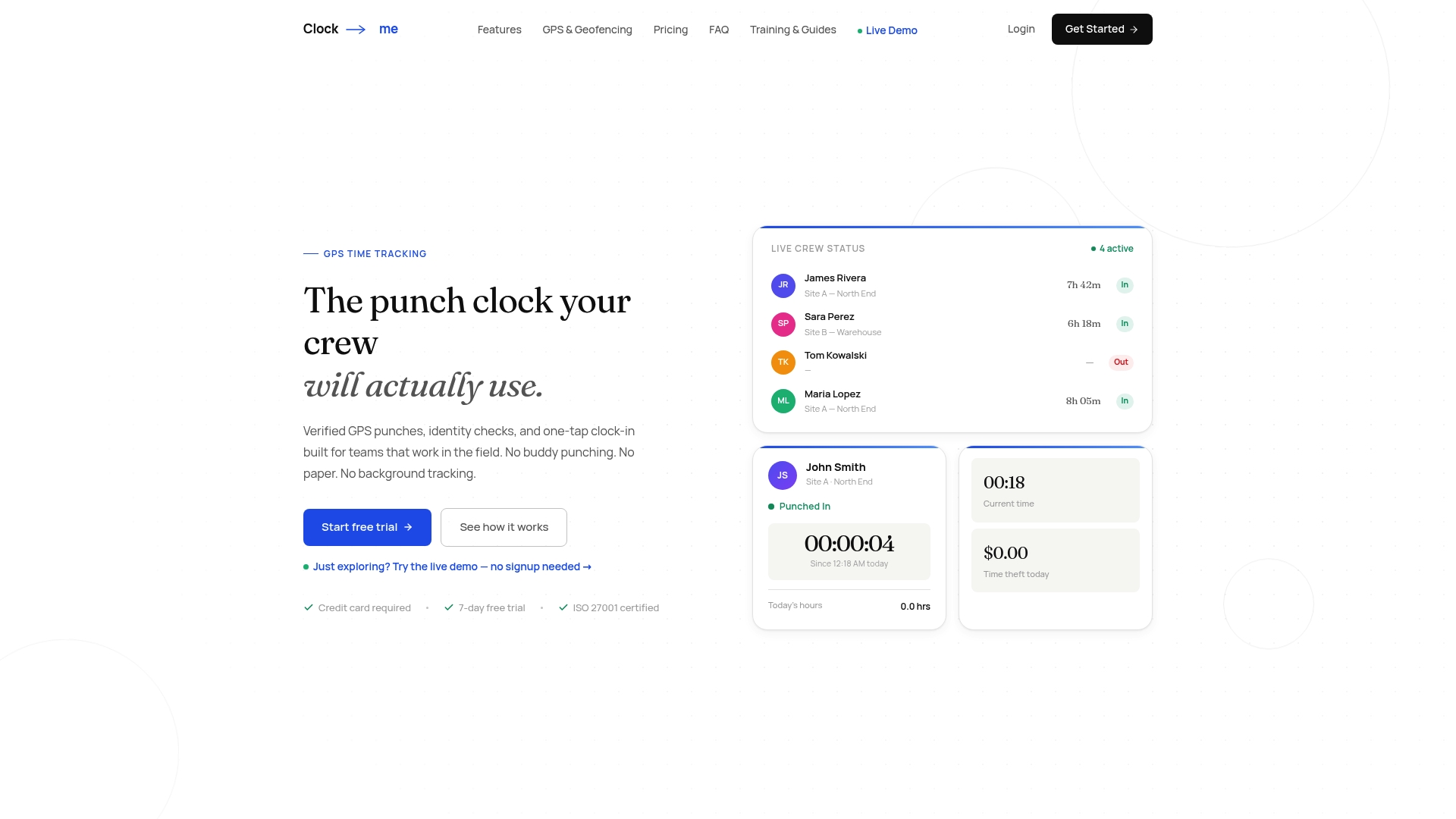
One platform builds directly toward the checklist above: GPS-verified clock-ins, identity verification, geofencing, and live dashboards, all through a one-tap interface built for field crews rather than office staff.
- One-tap clock-in with GPS verification at the moment of punch
- Identity checks that reduce buddy punching without adding friction
- Geofencing tied to specific job sites, with live dashboards for managers
- Attestation and audit-trail features built with compliance in mind
The GPS Time Tracking Setup Guide walks through onboarding step by step. A practical first move: run a one-week pilot on a single crew, complete one payroll dry run against your current process, then compare the two outputs before expanding further.
How Do Labor Laws Affect Construction Time Tracking?
Construction crews face compliance risk that office-based teams rarely see, since state and local labor law often layers additional requirements onto ordinary wage-and-hour rules. Prevailing wage jobs, for instance, typically require certified payroll reporting that breaks hours down by classification and job, which is nearly impossible to reconstruct accurately from paper timesheets after the fact.
Overtime calculation is where a lot of contractors get exposed. Rules vary by state, and some jurisdictions apply daily overtime thresholds in addition to weekly ones, meaning a worker who logs ten hours in one day may trigger overtime pay even if their weekly total looks fine. An automated system that timestamps every clock-in and clock-out removes the guesswork, since the record itself becomes the evidence in a wage dispute or audit.
Meal and rest break compliance adds another layer. Several states require documented breaks of a specific length at specific intervals, and missing or late breaks can trigger penalty pay. A time tracking system that prompts and logs breaks automatically creates a defensible record, rather than relying on a supervisor's memory weeks later.
Certified payroll and prevailing wage reporting requirements also mean your system needs an audit trail that can withstand scrutiny. Every edit to a timecard, whether it's a correction or a late punch adjustment, should be timestamped and attributed to a specific user. This isn't just good practice, it's often the difference between passing a Department of Labor audit cleanly and facing back-pay claims months later. Contractors bidding on public works projects should confirm any tool they adopt can generate the specific certified payroll formats their state or federal contracts require.
How Should Time Data Connect to Project Management Tools?
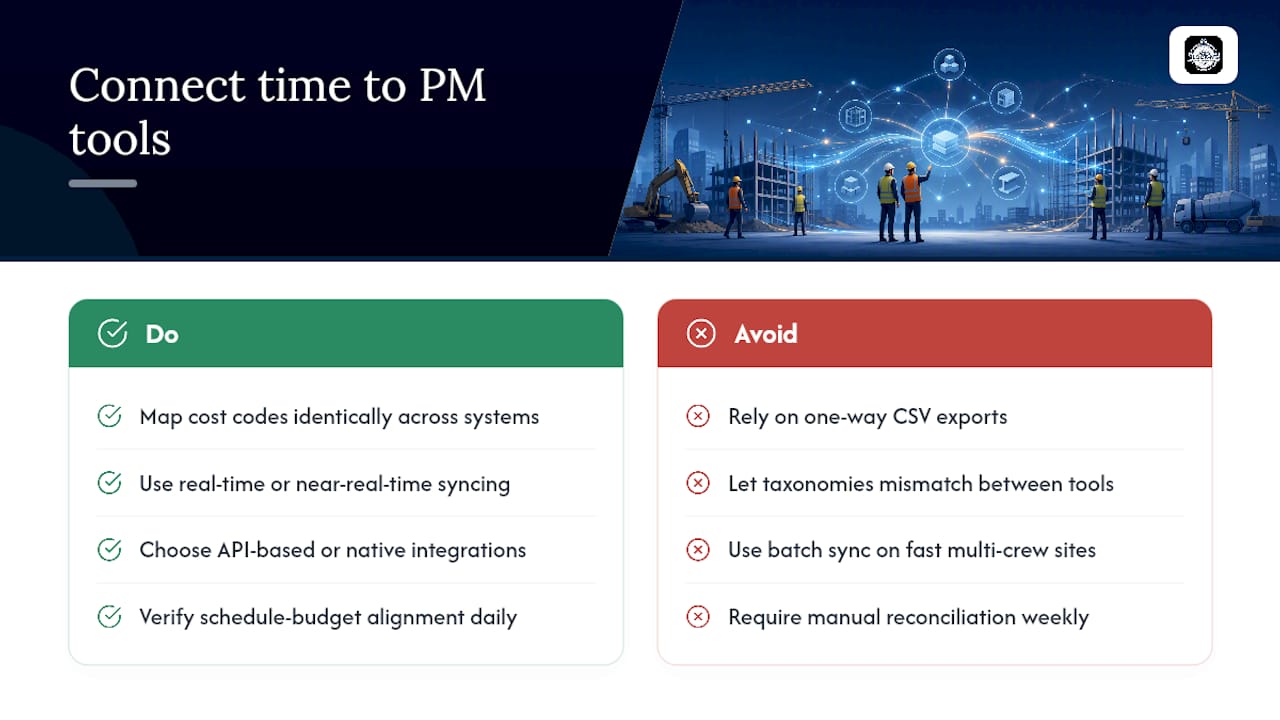
Time tracking data becomes far more valuable once it talks to your scheduling and project management systems instead of sitting in an isolated spreadsheet. The practical goal is a single source of truth where hours worked automatically reflect against the schedule and budget, rather than requiring someone to reconcile two systems manually every Friday.
Start by mapping cost codes consistently across both systems. If your project management tool tracks tasks by phase or work breakdown structure, your time tracking cost codes need to mirror that structure exactly, or the labor-cost reports won't line up with your schedule variance reports. Mismatched taxonomies are the single most common reason integrations fail in practice, not technical limitations.
Sync frequency matters more than most managers assume. Real-time or near-real-time syncing lets a project manager see labor burn against budget the same day it happens, which means a crew running over on a task gets flagged before the whole phase blows its budget. Daily or weekly batch syncing works for smaller jobs but creates blind spots on fast-moving, multi-crew sites.
Integration also reduces double data entry, which is where scheduling conflicts often originate. When a foreman updates a crew assignment in the scheduling tool, and that assignment doesn't automatically inform the time tracking app, someone ends up manually correcting timecards after the fact. Look for tools that support API-based syncing or established integrations with major project management platforms rather than one-way CSV exports that require manual re-import.
How Do You Track Time Across Remote and Multi-Site Crews?
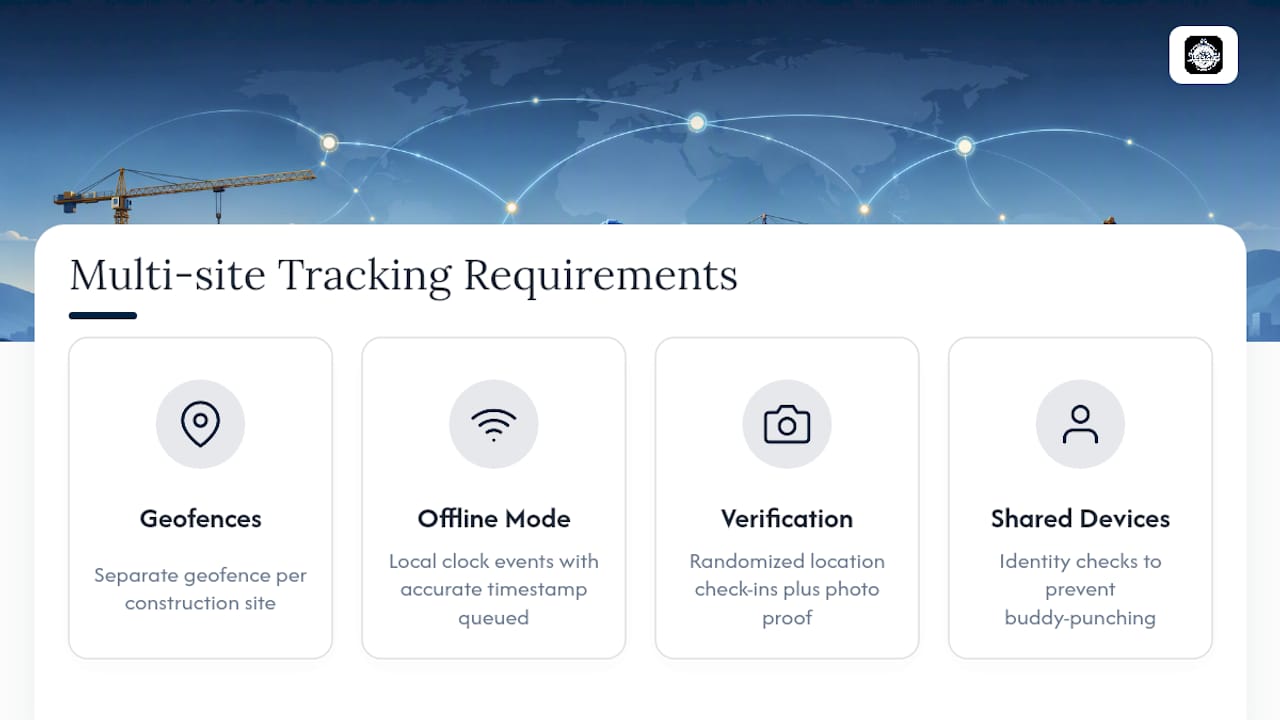
Multi-site construction outfits face a tracking problem that single-site contractors never encounter: the same crew member might work a morning shift at one site and an afternoon shift at another, twenty miles away. Geofencing handles this well in theory, since each site gets its own boundary, but it requires setting up and maintaining multiple geofences correctly, which is easy to get wrong when a project boundary shifts as construction progresses.
Connectivity is the bigger practical challenge. Remote sites, from rural infrastructure projects to sites without cell towers nearby, routinely lose signal entirely. A time tracking system built for construction needs genuine offline mode, meaning it captures the clock event locally with an accurate timestamp and queues it for sync rather than failing silently or requiring a live connection to function at all.
Multi-site crews also complicate supervisor oversight. A foreman managing three sites can't physically verify attendance at all of them simultaneously, which is exactly where randomized location check-ins and photo verification earn their value. These features let a manager confirm, after the fact, that someone was actually where they claimed to be, without requiring constant real-time supervision.
Device availability adds another wrinkle. Not every worker on a remote site carries a company smartphone, and personal device policies vary. Kiosk or shared-device modes solve this for sites where a single tablet or ruggedized device can serve an entire crew, provided the system layers identity verification on top so a shared device doesn't become a shortcut for buddy punching.
How Is Employee Time Data Protected in Construction Apps?
GPS location data and biometric identity verification are sensitive by nature, and construction contractors handling this data carry real responsibility, both legally and reputationally. Workers are understandably wary of being tracked by location throughout a shift, so transparency about what's collected and why matters as much as the technical safeguards themselves.
Look for platforms that limit GPS collection to clock-in and clock-out events, or defined check-in intervals, rather than continuous tracking throughout the workday. Continuous location monitoring raises both privacy concerns and unnecessary battery drain, and most legitimate compliance use cases don't require it. Clock-me's data safety documentation lays out exactly what's collected and how it's used, which is the level of disclosure worth expecting from any vendor handling employee location data.
Data retention policy deserves a direct question during vendor evaluation. Ask how long GPS and timecard data is stored, whether it's encrypted at rest and in transit, and who inside the vendor's organization can access raw location data. A vendor that can't answer these questions clearly is a vendor whose data practices probably haven't been fully thought through.
Employee consent and disclosure also matter operationally, not just legally. Workers who understand that GPS verification exists to confirm jobsite presence, not to monitor their movements off the clock, tend to adopt the system with far less friction. Clear internal communication about scope and purpose prevents the rollout from feeling like surveillance.
Does Time Tracking Actually Improve Project Timelines?
The connection between time tracking and project timelines is more direct than most contractors expect. Accurate hours-by-cost-code data means a project manager spots a phase running over budget in real time instead of discovering it during a post-mortem, which allows for crew reallocation while there's still time to recover the schedule.
Labor cost visibility also improves bid accuracy on future projects. Contractors who can pull historical, cost-code-level labor data from past jobs build tighter, more competitive bids, because they're pricing based on what tasks actually took, not on rough estimates carried forward from memory. This is one of the more overlooked, cumulative benefits of consistent time tracking, and it compounds project after project.
Reduced payroll disputes free up administrative time that would otherwise go into reconciling timesheets, chasing down missing hours, or resolving disagreements about when someone actually left the site. That time gets redirected toward higher-value planning and scheduling work.
Faster payroll processing itself has a secondary effect on crew retention and morale. Workers who trust that their hours are recorded and paid accurately, without needing to argue about it, tend to show fewer attendance issues over time. None of this shows up as a single dramatic metric, but the cumulative effect on schedule adherence across a multi-month project is measurable in fewer overrun phases and tighter budget-to-actual variance.
A Site Manager's Take on Realistic Timelines
Most managers underestimate how much of this is change management, not technology. The tech works on day one; getting crews to actually clock in correctly takes longer. Expect real accuracy gains by week four and faster payroll by week six to eight. Spend the first 30 days on enforcement, not features.
— Clock-me
Get Started With Clock-me's GPS Time Tracking
One provider checks every box on the evaluation list above: GPS-verified clock-ins, identity verification, geofencing, live dashboards, and one-tap punching that doesn't require paperwork or a training manual to use correctly. Instead of piecing together a mobile app for field crews and a separate approval workflow for the office, you get one system that handles both.
If you're ready to see whether it fits your crews, the GPS Time Tracking Setup Guide walks through onboarding in minutes, not days. For a closer look at how geofencing and identity verification work together on an active jobsite, the solutions overview breaks down each feature in plain terms. Start with a single-crew pilot, run one payroll cycle in parallel with your current process, and compare the results before deciding to expand.
Sources
- Construction Time Tracking Software | Procore
- Construction Time Tracking Software - Raken
- Construction timesheet app - Clockify™
- 10 Best Construction Time Tracking Software in 2026
FAQ
What Is the Best Approach to Construction Time Tracking?
Automated GPS-verified clock-ins combined with manager approval workflows and direct payroll export deliver the most accurate job-cost data with the fewest disputes. Some platforms build this workflow directly into a one-tap mobile experience.
How Does GPS Verification Prevent Buddy Punching?
GPS verification confirms a worker's device location matches the jobsite geofence at the moment of clock-in, and pairing it with identity verification (photo or biometric) helps confirm the right person is actually punching in. Audit trails then log every edit for accountability.
Can Construction Time Tracking Work Without Cell Signal?
Yes, reliable systems include offline mode that captures the clock event locally with an accurate timestamp and syncs automatically once connectivity returns. This matters most for rural or basement-level jobsites with poor reception.
What Should I Check Before Choosing a Construction Timesheet App?
Confirm GPS verification with an audit trail, direct payroll export (CSV, XLSX, or integration), offline mode, and a manager approval workflow. Ask for a sample export preview and run a small pilot before committing to a full rollout.
Does Time Tracking Improve Payroll Accuracy?
Yes. Automated GPS-verified tracking paired with approval workflows removes manual re-entry, which is where most payroll errors originate, and cuts down on disputed hours significantly compared to paper timesheets.